About the Author: Michael
As a certified automotive locksmith operating throughout Staten Island, I handle hundreds of car lockout and key programming scenarios annually. I specialize in Toyota transponder systems, Smart Key proximity protocols, and EEPROM programming.
A dying key fob is more than an inconvenience; if left unaddressed, it can strand you in a parking lot. Fortunately, replacing the battery in a Toyota remote is a straightforward process that requires zero programming knowledge and costs less than $5.
Dealerships often charge upwards of $50 to perform this 60-second task. In this comprehensive master guide, I will detail exactly how to open your specific fob without shattering the plastic housing, which batteries to buy, and what to do if your car refuses to start even with a fresh battery installed.
1. Recognizing the Symptoms of a Depleted Battery
Lithium coin batteries do not die instantly. The voltage curve drops gradually over 3 to 5 years. You will notice clear warning signs long before total failure:
- Diminished Range: If you must stand closer than 10 feet to unlock the doors, the transmitter signal is weak.
- Dashboard Warnings: Modern Toyotas (Camry, RAV4, Highlander) display a direct "Key Battery Low" message on the multi-information display behind the steering wheel.
- Inconsistent Proximity Detection: For Smart Key models, the doors may fail to unlock when you grasp the handle, or the push-to-start button may occasionally flash orange instead of green.
2. Identifying Your Exact Battery Type
Using the wrong battery can permanently damage the internal circuit board or warp the contact prongs. Always verify the etched number on your old battery before purchasing a replacement.
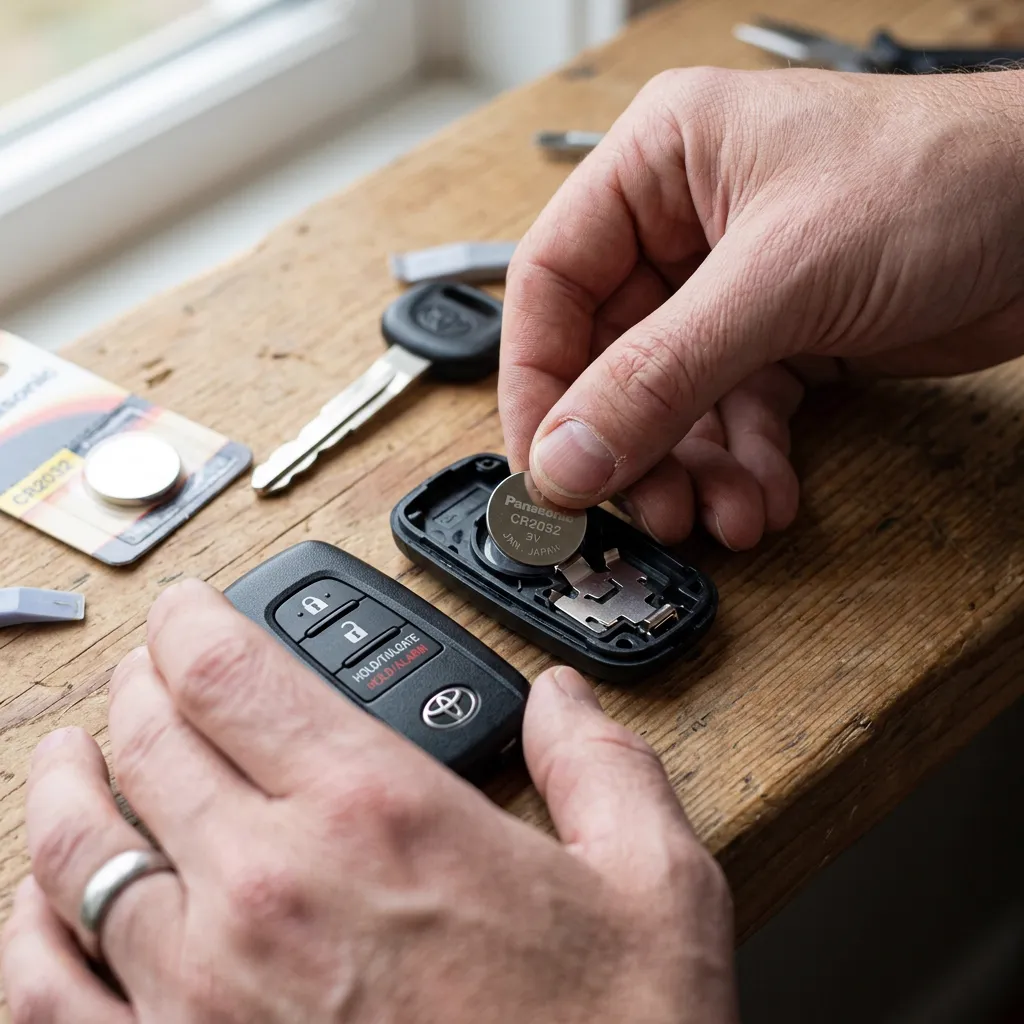
- CR2032: The absolute standard for 95% of Toyota Smart Keys manufactured from 2010 to present. It outputs 3 volts and is 3.2mm thick.
- CR1620: Used in older generation integrated remote keys (where the metal key blade is fixed to the fob) common in early 2000s models.
- CR2016: Occasionally found in aftermarket or separate alarm fobs. Do not stack two CR2016s in place of a CR2032; the combined 6 volts will fry your transmitter.
Locksmith Tip: Stick to Panasonic, Sony, or Energizer. Cheap generic batteries from dollar stores often leak corrosive acid or fail within months due to poor shelf stability.
3. The Safe Toolset: Avoiding Case Damage
Do not use a kitchen knife. The plastic seams on Toyota fobs are delicate. You need:
- A micro flathead screwdriver (the size used for eyeglasses).
- A small piece of electrical tape (to wrap the tip of the screwdriver to prevent gouging the plastic).
- Alternatively, a nylon spudger or guitar pick is the absolute safest tool for separating the shell.
4. Step-by-Step Replacement Procedure (Modern Smart Key)
Follow these exact steps for any Toyota push-to-start proximity fob:
- Release the Mechanical Key: Locate the small sliding latch on the bottom or side of the fob. Slide it over and pull the hidden metal key blade out.
- Pry the Shell Open: Look inside the slot where the mechanical key was housed. You will see a small rectangular notch. Insert the tip of the mechanical key (or your taped flathead) into this notch and twist gently. The two halves of the plastic shell will pop apart.
- Lift the Circuit Board: Gently lift the green motherboard out of the rubber housing. Do not touch the microchips or solder points directly; handle it by the edges.
- Remove the Battery: Note the polarity. The positive (+) side facing up is standard for Toyota. Use your mini flathead to carefully pop the battery out of its circular retention clip.
- Insert the New Battery: Slide the new CR2032 in, ensuring the positive (+) side faces upward. Snap it securely into the clip.
- Reassembly: Place the circuit board back into the rubber membrane. Align the two plastic shell halves and squeeze them together until they click firmly on all sides. Reinsert the mechanical key.
5. The Emergency Bypass: Starting a Toyota with a Dead Fob
If your battery dies completely while you are away from home, you are not stranded. Every Toyota Smart Key contains a passive RFID transponder chip that does not require battery power to function.
The Override Protocol: First, use the hidden mechanical key to manually unlock the driver's side door. (The alarm may sound; this is normal). Sit in the driver's seat and depress the brake pedal. Hold the Toyota emblem side of the dead fob directly against the push-to-start button. The car's internal antenna will induce a tiny electrical current into the fob's RFID chip, verifying the security code. The start button will turn green. Push it to start the engine.
6. Post-Replacement Troubleshooting
In rare cases, the fob may not immediately work after a battery swap.
If the buttons are unresponsive, open the fob again. Check the gold or silver battery contact prongs. If they are flattened, gently pry them upward with a needle to restore tension against the battery. If you see white powdery corrosion, dip a Q-tip in rubbing alcohol (isopropyl 90%+) and clean the contacts. Unlike older alarm systems, Toyota Smart Keys do not lose their programming or desynchronize when the battery is removed. If the fob still fails to transmit, the internal oscillator or motherboard may be damaged, requiring a full replacement and reprogramming by an automotive locksmith.
Winter Weather Warning for Staten Island Drivers
Lithium battery chemistry slows down in extreme cold. If you leave your spare key in an unheated garage during a January freeze, it may temporarily fail to transmit enough voltage to open the doors. Warm the fob in your hands for a few minutes before assuming the battery is dead.
Changing a fob battery is a simple, high-reward DIY task. However, if your key housing is cracked, the buttons are destroyed, or the circuit board has suffered water damage, a battery won't fix it. In those scenarios, bypass the dealership markup and contact a licensed automotive locksmith for a fraction of the cost.